

Inside every ABB IRC5 controller, cooling fans keep the Drive Unit, Axis Computer, and Main Computer operating within safe temperatures. When airflow drops from worn bearings or dust buildup, heat rises fast, leading to over-temperature faults, reduced drive life, or even total failure.
A single failed fan can overheat a $5,000–$8,000 drive and stop production. Replacing fans early is simple, inexpensive, and prevents costly downtime.
Airflow and System Overview
IRC5 controllers pull cool air from the bottom intake vents and exhaust heat out the top and rear. Each drive module has a 24 VDC fan mounted on the underside, powered through a 2- or 3-pin connector.
ABB fault thresholds activate late in the process — meaning a fan can be underperforming long before alarms appear. Regular inspection is key.
Signs a Fan Needs Replacement
- Rising drive temperatures under normal load
- Grinding or rattling noise on startup
- Weak airflow at cabinet vents
- Dust buildup or heat discoloration
- Intermittent drive over-temp warnings
Tools and Safety
Tools: T-25 Torx bit and driver, needle nose pliers, replacement fan(s), compressed air or vacuum, and clean lint-free cloth and 99% isopropal-alcohol.
Safety:
- Power down and lock out main power.
- Confirm zero voltage before working inside.
Replacement Procedure
1. Access the Drive Bay –Unscrew the back covers and pull up and out.
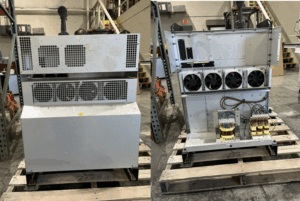
2. Locate the Fan – Found under each drive or rectifier module.
3. Disconnect Power – Unplug the small 24 VDC connector.
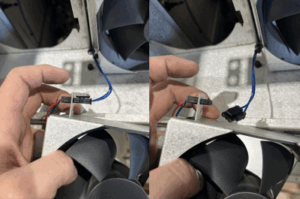
4. Remove the Fan – Slide up and pull out the metal housing. With pilers pull the fan connecter from the metal housing
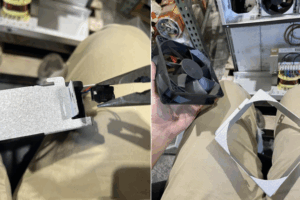
5. Clean the Area – Blow out debris and clear air paths.
6. Install New Fan – Match airflow direction into the drive module (sticker side towards drive fins)
7. Reassemble & Verify – Power on, confirm fans spin quietly, put your hand against the cover and verify air is sucking into the controller and not blowing out.
Maintenance Best Practices
- Inspect and clean every 6–12 months.
- Replace fans every 3–5 years or at the first sign of noise or rising temperature.
- Maintain ambient temperature below 40 °C (104 °F).
- Use clean intake air filters on controller vents — they reduce dust buildup on fan blades and drive fins, extending both fan and drive life.
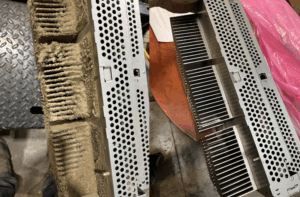
- Record replacement dates on each module for traceability.
All of these preventive tasks are included in Bow Robotics’ Controller Preventive Maintenance Service — where our expert technicians inspect, clean, and replace fans, filters, and key cooling components to keep your robots running at full reliability.
The Cost of Waiting
A few fans protect thousands in drive hardware and prevent hours of unplanned downtime. Thermal damage from poor airflow can destroy modules, rectifiers, or even the main computer.